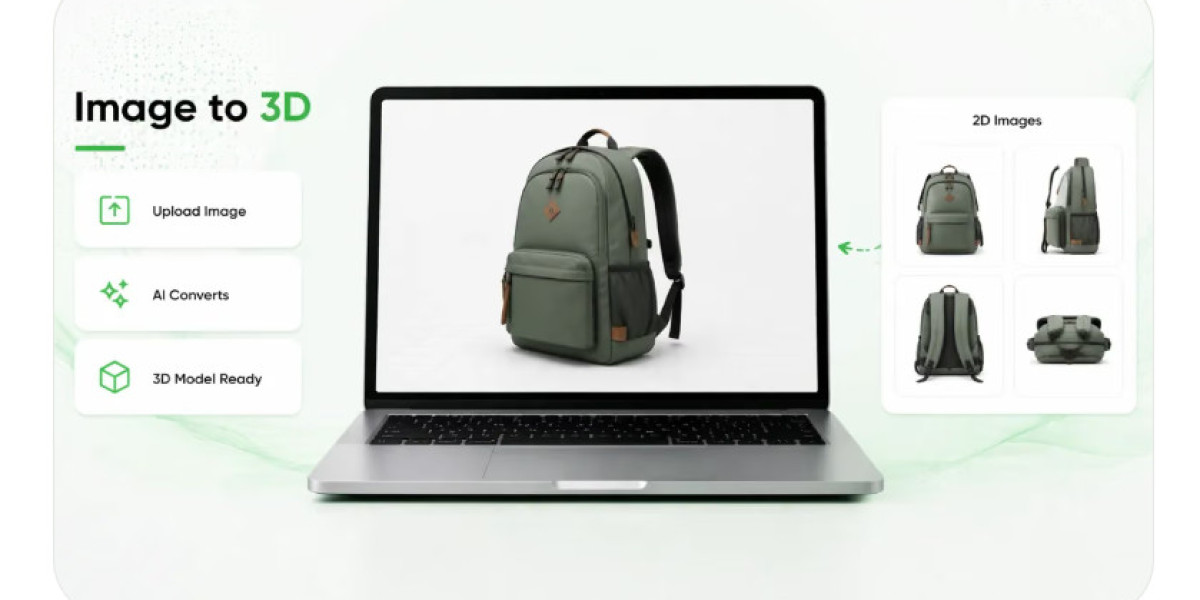

A product image often determines whether someone pauses to learn more about an item or continues browsing. On a website, marketplace, or digital advertisement, a photograph can communicate appearance, suggest quality, and introduce a product within seconds. Yet the role of that image does not have to end once the customer has seen what the product looks like. With thoughtful design and suitable digital tools, a photograph can become an invitation to discover additional information, examine details, and interact with a product in a more meaningful way.
This possibility reflects a wider change in digital commerce. Customers increasingly move between different sources of information before making purchasing decisions. They may view a photograph on social media, visit a product page, compare specifications, and search for demonstrations before deciding whether an item meets their needs. Businesses can support this process by creating visual experiences that encourage further exploration instead of treating every image as an isolated marketing asset.
The transformation does not require every photograph to become a complex interactive presentation. Sometimes, a useful link to a demonstration or a clearer view of an important feature is enough. In other situations, augmented reality or three-dimensional content can provide a different perspective that conventional photography cannot easily deliver. The key is to make exploration feel natural, relevant, and worthwhile for the customer.
The Moment Curiosity Turns Into Interaction
An effective product image creates an immediate impression, but an even more effective presentation gives viewers a reason to take another step. A photograph of a comfortable armchair, for example, might attract attention because of its shape and upholstery. A customer who likes its appearance may then want to understand its dimensions, examine the frame, or imagine how it might look in a living room.
That transition from visual interest to active investigation is important. Customers rarely want additional features simply because a business offers them. They want information that helps answer a question, resolve uncertainty, or make a decision easier.
Businesses can encourage this behavior by connecting images with relevant next steps. A product photograph might lead to a closer inspection of specific components, a short demonstration, or an interactive model. A picture of a kitchen appliance could introduce a presentation explaining its controls, while an image of decorative lighting might open a visualization that helps customers understand its proportions.
These experiences should build on the original image rather than distract from it. If customers must navigate several confusing screens before reaching the information they want, the opportunity for exploration may disappear. A clear visual starting point, a recognizable action, and a useful result can make the transition much more effective.
Designing Images That Encourage Questions
Not every product photograph naturally encourages further investigation. Some images are designed primarily for atmosphere, while others emphasize particular features or communicate practical information. Understanding the purpose of each image can help businesses determine what kind of experience should follow it.
A lifestyle photograph of a sofa might create an emotional connection by showing the product in an attractive living space. However, it may not provide a clear view of the sofa's structure or dimensions. A separate product image could answer those practical questions, while an interactive presentation might provide another way to examine the item.
This suggests that visual content should be planned as a connected experience rather than a collection of unrelated files. Each image can perform a different role, guiding the customer from initial discovery toward a better understanding of the product.
Businesses should also consider the questions their audiences ask most frequently. If customers regularly inquire about available finishes, the image experience could make those options easier to compare. If buyers struggle to understand how a product fits into a particular environment, spatial visualization may be more relevant.
The best experience emerges when the next interaction responds to an actual need. Instead of adding features to make a product page appear technologically advanced, companies can use customer questions to determine which features deserve attention.
Moving From Written Ideas to text to augmented reality
Some product experiences begin with an idea rather than a finished design. A marketing team may want a customer to scan a printed package and discover additional information, or a retailer may imagine a mobile experience that reveals a product demonstration after a visitor interacts with an image.
A text to augmented reality workflow may help explore such ideas when the selected platform supports turning written descriptions into AR-oriented concepts or outputs. The written brief can establish what the customer should see, which product information matters, and how the experience should respond to an interaction.
For example, a company selling garden equipment could describe an experience that introduces a product, highlights important components, and provides guidance about its intended use. A home accessories retailer might outline a concept that lets shoppers explore a decorative object through a compatible mobile experience.
Writing down the idea before production helps teams communicate their intentions clearly. It also provides a reference for reviewing the result. If the generated experience does not explain the product effectively or introduces unnecessary steps, the team can identify the mismatch and revise the concept.
However, written descriptions alone cannot guarantee that the finished result will match the original intention. Available tools differ in their capabilities, and an AR experience may still require suitable images, digital models, interface design, and technical preparation. Any generated content should be reviewed for accuracy and usability before customers encounter it.
The value of this process lies in making early exploration more concrete. Teams can investigate how an idea might work before committing to a larger development effort.
Giving Flat Images a Sense of Depth
Photography captures a product from a particular viewpoint. Even a carefully prepared image cannot reveal every surface or communicate every spatial relationship. This limitation is not a weakness of photography; it simply reflects the difference between viewing an object in two dimensions and exploring a digital representation that contains depth.
Three-dimensional content can offer customers additional freedom. A model may allow them to rotate an object, examine its shape from several angles, and understand how different components fit together. Depending on the application, it may also be possible to place the model within a real environment using augmented reality.
A Text to 3D workflow can provide a way to explore this kind of content from a written concept. Depending on the software, a description of an object's shape, appearance, and materials may be used to generate an initial three-dimensional model. Such a model can help a team visualize an idea or investigate how a product might be presented interactively.
For instance, a business developing a new decorative accessory could use an early model to discuss its overall appearance before investing in detailed production. A marketing team might test whether customers find a rotatable representation more informative than a fixed image.
There are important limitations to consider. A generated model may contain incorrect proportions, missing components, or surface details that do not reflect the real product. Written descriptions may also leave important dimensions unspecified. For commercial applications, teams should verify the model against reliable references and refine it when greater accuracy is required.
A three-dimensional presentation is most useful when its added depth helps customers understand something that was difficult to judge from a photograph alone.
Creating a Natural Path From Viewing to Discovery
An invitation to explore should feel like a continuation of the customer's original activity. Someone browsing a product page should not need to understand unfamiliar technical terminology or complete a complicated process before accessing additional content.
The entry point needs to be obvious. A clear instruction such as viewing a product in a room, exploring the model, or examining additional details communicates what will happen next. The resulting experience should then deliver the expected information without unnecessary interruptions.
Mobile access is particularly important because many customers encounter product images on their phones. A link-based experience can reduce the need to search for separate content, while a compatible browser-based AR presentation may allow people to interact without installing a dedicated application. Actual access requirements depend on the platform and the features being used.
Businesses should also make sure that essential information remains available when interactive content cannot be opened. A customer with an unsupported device or limited connectivity should still be able to read product descriptions, review measurements, and examine conventional photographs.
The experience should respect the customer's time. Short loading periods, understandable controls, and a clear way to return to the original product page all contribute to a smoother journey. The more naturally the interaction fits into existing browsing habits, the easier it becomes for people to try it.
Choosing Products That Benefit From Exploration
Although interactive visuals can be applied to many product categories, the potential benefits differ considerably. Businesses should identify where additional exploration helps customers understand the item rather than assuming every product needs the same treatment.
Furniture is one example because dimensions, proportions, and placement often influence purchasing decisions. A customer may appreciate being able to inspect a chair from several directions or visualize its general appearance in a room. Home decoration products can also benefit when their shape and relationship to surrounding objects are important.
Consumer electronics present different opportunities. An interactive presentation might explain the location of ports, buttons, or detachable components. A three-dimensional model could help customers understand the overall structure of a device before reading detailed specifications.
For everyday products with familiar shapes and limited decision complexity, conventional images may already provide sufficient information. In these cases, a concise description, additional photograph, or short demonstration may be more useful than an elaborate AR experience.
Businesses should weigh the value of added information against the effort required to produce and maintain it. A focused approach helps ensure that interactive content is introduced where it can make a meaningful difference.
Connecting Physical Discovery With Digital Exploration
Product images do not only appear on websites. They are also used in packaging, printed catalogs, retail displays, product inserts, and promotional materials. These physical touchpoints can become useful starting points for digital exploration when they provide a clear way to access additional content.
A customer looking at a product in a showroom might scan a QR code to open a page with more photographs and specifications. Someone reading a printed catalog could use a link to explore an interactive presentation of an item that is difficult to display physically. Packaging might direct customers to instructions, product demonstrations, or information about compatible accessories.
These connections are valuable because they allow people to continue learning without having to remember a product name or manually search for a particular webpage. The physical image introduces the item, while the digital experience expands on it.
The transition must be designed carefully. Codes should be easy to find and scan, links should lead to the correct product, and the destination should work well on mobile devices. If the digital experience is slow or unrelated to the image that attracted attention, the connection loses its purpose.
Businesses should also consider the situation in which the image appears. A customer standing in a busy retail aisle may need a quick, straightforward interaction, while someone browsing a catalog at home may have more time for detailed exploration.
Making the Experience Trustworthy and Useful
Interactive presentation can help customers understand products, but it also creates a responsibility to represent them accurately. If a digital model looks substantially different from the item delivered, the experience may increase uncertainty instead of reducing it.
Product dimensions, colors, materials, and visible features should therefore be checked carefully. Lighting and screen differences can affect how colors appear, and digital placement may not perfectly reproduce the conditions of a real environment. Businesses should provide measurements and clear product information wherever these details influence the purchase.
Privacy and permissions also deserve attention. An AR experience that uses a device camera should explain why access is needed and allow customers to make an informed choice. Camera functionality should not be introduced unexpectedly when it is unrelated to the feature being offered.
Accessibility should be part of the design process as well. Instructions need to be understandable, controls should be easy to recognize, and important information should not exist exclusively inside an interactive model. Supporting conventional viewing methods ensures that customers can still benefit from the content when AR is unavailable or unsuitable.
Trust develops when the experience delivers what it promises. A simple, accurate presentation can be more effective than a visually impressive demonstration that leaves important questions unanswered.
Learning From How Customers Explore
Once an interactive image experience is available, businesses can examine whether customers are finding it useful. The relevant measures depend on the original purpose. A product demonstration might be evaluated through successful launches and completion rates, while a spatial visualization could be assessed through interaction activity and customer feedback.
However, high engagement does not automatically indicate a better experience. Customers may spend more time interacting because they are interested, or because the interface is confusing. Businesses should combine usage data with questions that reveal whether people understood the product more clearly.
Customer comments can identify practical improvements. Shoppers might request additional viewing angles, clearer dimensions, a faster loading experience, or a more direct route back to the product page. These findings can guide changes to both the visual content and the interface.
Testing different versions can also help. A business might compare a standard gallery with a version that includes a three-dimensional model, then examine the results alongside feedback and relevant purchase behavior. The comparison should account for other factors that could influence outcomes.
The purpose of measurement is to determine whether exploration adds real value. If a simpler presentation answers customers' questions effectively, the business does not need to introduce more complexity merely to demonstrate technological capability.
Conclusion
A product image can serve as more than a static representation of an item. It can introduce a question, encourage discovery, and guide customers toward additional information that helps them understand what they are considering. With suitable digital tools, that familiar photograph may lead to an interactive presentation, an augmented reality experience, or a three-dimensional model.
The most effective approach begins with the customer rather than the technology. Businesses should identify the information people need, choose products that genuinely benefit from additional exploration, and make the next step clear and accessible. Written concepts and automated generation tools can help teams investigate ideas, while careful review protects the accuracy and usefulness of the final result.
When visual content is designed as a connected journey, each interaction has a reason to exist. Customers can move from curiosity to understanding without unnecessary friction, and businesses can extend the usefulness of their existing product imagery. The photograph remains the starting point, but the experience it creates can reach much further.